Changing your Windows Startup Sound:
Open up your Control Panel
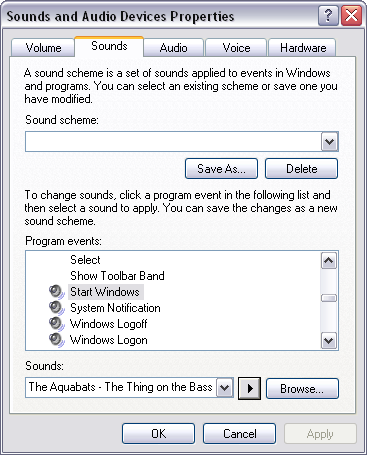
Click on “Sounds and Audio Devices”
Go into the “Sounds” Tab
Scroll down to “Start Windows”
Click “Browse”
Select the file you have just changed.
You can test it by pressing the play button to make sure you have the right one.
Restart your computer:
The final step is to test out your new creation. Restart your computer and see how it all sounds and if it is the correct length. Try to open a program immediately after the sound sample is finished and ensure that it loads up swiftly.

No comments:
Post a Comment